![AccountAbility_logo_primary_fullcolor-1.png]](https://knowledgebase.counta.com/hs-fs/hubfs/AccountAbility_logo_primary_fullcolor-1.png?height=40&name=AccountAbility_logo_primary_fullcolor-1.png)
What is ISO 20022?
ISO 20022 is a global standard for electronic payment messaging. It defines a common language for financial transactions, replacing older proprietary formats with a single, structured XML format that works across banks and borders.
Counta supports the pain.001.001.03 message type (Customer Credit Transfer Initiation), which covers outbound payments including ACH, wire transfers, checks, SEPA, and BACS.
Why a universal standard matters
Before ISO 20022, every bank had its own file format. A company banking with multiple institutions needed to build and maintain separate integrations for each one. ISO 20022 changes that: the same XML structure works across banks, with only minor configuration differences.
Counta's implementation was developed using JP Morgan's ISO 20022 documentation, which means all universally required fields are supported. The file should work with any ISO 20022-compliant bank, though as with any electronic banking file, you should test with your bank portal before going live.
Note:
With the current process, you generate the XML file from Counta and upload it to your bank's portal manually. If your bank supports electronic transmission (SFTP), contact your bank first to discuss connectivity options, then reach out to your Counta Account Lead. Additional configuration or development may be required to enable direct transmission with specific bank(s).
Why does it matter?
For finance teams:
- One export format works for ACH, Wire, Check, SEPA, and BACS payments
- Standardized remittance information travels with the payment
- Easier to switch banks or add new banking relationships
For agencies with global operations:
- Pay suppliers in the US, UK, EU, and Canada from a single workflow
- Consistent process across regions
- Supports structured address requirements for EU cross-border payments
How does it work?
There are two parts: Set up (one-time configuration) and payment file generation (ongoing use).
Part 1: Set Up
-
Payment Types
The following Payment Types are automatically mapped to ISO 20022 codes. We added these to existing databases, and they're ready to use. Deactivate any payment types that are not applicable to your agency.Payment Type in Counta What it's used for ACH US Corporate ACH ACH-SD US Same Day ACH WIRE US Wire Check US Check ACH-CA Canada ACH SEPA SEPA Credit Transfer (for EU) BACS UK BACS When you assign one of these Payment Types to a payment, Counta populates the ISO Payment Method, Service Class, and Local Instrument fields in the XML file.
- GL Bank Account Configuration
- Navigate to Master Files > GL Accounts and click on the specific GL Account No. hyperlink to launch its General Ledger Account form.
- Click on the Banking Details hyperlink at the top of the page. This link is only visible if the Bank Account box is checked.
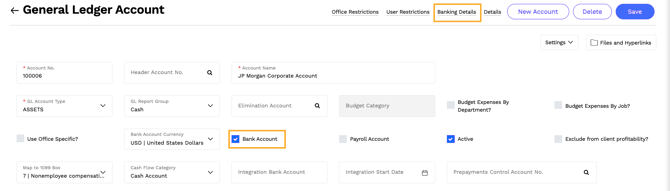
- Make sure that the Bank Account Currency is populated.
- On the Bank Account Details form, check the ISO Payment File Enabled box. This option allows you to generate an ISO XML payment file for this bank account.
- Populate the following fields with the relevant information. At the time of payment file generation, the system validates that all required fields are populated.
Field Description Bank Remitter Name Enter the company name associated with this bank account.
This is used to populate the Initiating Party Name on the Header and the Debtor Name on the Payment Information section of the XML.
Bank User ID No. Enter your financial institution's Customer ID, e.g., JPM Customer ID
This is used to populate the Organization ID in the Identification section of the XML Header.
Bank No. Enter your financial institution's unique domestic clearing identifier or international clearing code, such as a US Routing Code, UK Sort Code, or European BIC (SWIFT Code.
This value populates the routing and agent details within the Payment Information section of the XML file.
Bank Account Number Enter your bank account number or IBAN.
Bank Country Enter the 2-character ISO Country code. See full list here.
- When this is required: This field is conditionally required if your bank enforces fully structured address details, or if you are using a local domestic clearing identifier (such as a US Routing Number or UK Sort Code).
- International Payments: For cross-border transactions, this code is strictly required to pass global regulatory screening and prevent file rejection by the processing bank.
Bank Org ID Enter your organization identifier and its qualifying scheme name, separated by a space, hyphen, space (e.g.,
1122334455 - JPMCOID).Contact your financial institution to obtain these values.
-
Supplier Information
Each supplier you pay via the ISO 20022 payment file format needs complete banking and contact information.
- Required Supplier Details
- Supplier Name
- Country of Domicile - Used for Supplier's address
- Pay-to-Bank Account Number
- Pay-to-Bank No.
- For EU Payments (SEPA), structured address is required: The supplier's Default Payment Contact must include the following.
- Address 1
- City
- Zip Code
- Required Supplier Details
Part 2: Generate the payment file
Step-by-step instructions:
- Navigate to Accounting> Payables > Payments
- Select the GL Bank Account that you will be paying out of and apply relevant filters.
- Select one or more payments to include the file. If selecting all payments, you will be prompted whether to select only payments from the current page or all pages that match your filters.
- Click Send ISO Payment File.
The system generates an XML file in pain.001.001.003 format that you can upload to your bank's portal.
Validation
If required information is missing, the system displays a message explaining what needs to be corrected. Update the relevant bank account, supplier, contact, or payment record and generate the file again.
Important notes:
-
All payments included in one file must use the same GL bank account.
- Bank Country must use the appropriate two-character country code.
- The supplier’s Country of Domicile is used as the supplier country.
- Structured address information is required for EU bank payments. Complete all available Default Payment Contact fields. Blank optional fields are omitted from the file.