![AccountAbility_logo_primary_fullcolor-1.png]](https://knowledgebase.counta.com/hs-fs/hubfs/AccountAbility_logo_primary_fullcolor-1.png?height=40&name=AccountAbility_logo_primary_fullcolor-1.png)
Overview
The Scheduled Invoice List provides visibility into media activity from media schedule entries and their associated scheduled client invoicing.
The report can be used to support both pre-billing review and post-billing reconciliation by providing the underlying media activity, scheduled invoice dates and amounts, and relevant billing information.
Scheduled invoice dates and amounts are generated automatically based on the configuration of the underlying media schedule entry. For more information on how the system determines scheduled invoice dates and amounts, refer to the Verifying Media Scheduled Invoices article.
Step 1: Navigate to the Scheduled Invoice List
- Go to the Media menu.
- Select Media Reports.
- Locate the Client Insertion and Scheduled Invoice Lists section.
- Click Scheduled Invoice List.
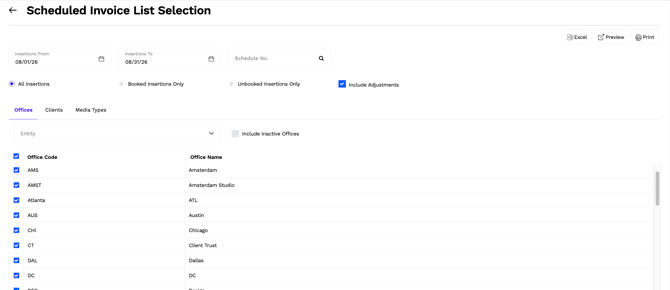
This will open the report request page.
Step 2: Select the Report Parameters
Use the available report parameters to define the media activity to include in the report.
For the insertion selection, choose from:
- All Insertions – Includes both booked and unbooked media schedule entries.
- Booked Insertions Only – Includes only media schedule entries that have been booked.
- Unbooked Insertions Only – Includes only media schedule entries that have not been booked.
Note: If your agency does not use the media booking functionality, select All Insertions.
Include Adjustments
Select Include Adjustments to include media schedule entries with either of the following adjustment types:
- Bill Client & Pay Media
- Bill Client, Don't Pay Media
Media schedule entries with an adjustment type of Pay Media, Don't Bill Client are not included in the Scheduled Invoice List, as these entries do not have an associated client billing amount.
Step 3: Generate the Report
The Scheduled Invoice List can be generated as either a PDF report or an Excel export, depending on how you would like to review or analyze the information.
- Click Preview or Print to generate the PDF report on screen.
- Select the Excel export option to generate the report in Excel.
PDF Report
The PDF report is organized in the following hierarchy:
Office > Client > Product > Media Schedule
Within each office, media activity is grouped by client and product, with each media schedule presented separately.
The media schedule header provides additional information that can be useful when reviewing media prior to billing, including:
- Media Estimate version
- Media Estimate status
- Media Estimate acceptance status
- Client Order Number
- Media schedule currency
The Media Estimate information can be used to confirm the current estimate and client approval status alongside the media activity scheduled for billing. The Client Order Number can also be referenced to confirm the applicable client order or PO information prior to billing.
The detail section displays the individual media schedule entries and their scheduled invoice information, including the media schedule entry Start Date and End Date.
This information can also be used after billing to review the underlying media activity and reconcile scheduled amounts to client billing.
Scheduled Amounts and Currency
All monetary values on the report are displayed in the media schedule currency (billing currency).
The applicable schedule currency code is displayed with the amount fields so scheduled billing can be reviewed in the currency of the underlying media schedule.
Product and client totals are displayed when the underlying media schedules use the same schedule currency. If multiple schedule currencies exist within the applicable grouping, these totals are suppressed to avoid combining amounts in different currencies.
Excel Export
The Excel export presents the Scheduled Invoice List in a flat format, allowing the scheduled invoice information and underlying media activity to be easily filtered, sorted, and analyzed.
Each row represents scheduled invoice activity for a media schedule entry and includes the relevant media, scheduling, billing, and invoice details.
The export can be used for both pre-billing analysis and post-billing reconciliation, including identifying the client media invoice associated with the scheduled media activity.