![AccountAbility_logo_primary_fullcolor-1.png]](https://knowledgebase.counta.com/hs-fs/hubfs/AccountAbility_logo_primary_fullcolor-1.png?height=40&name=AccountAbility_logo_primary_fullcolor-1.png)
Step by Step Guide:
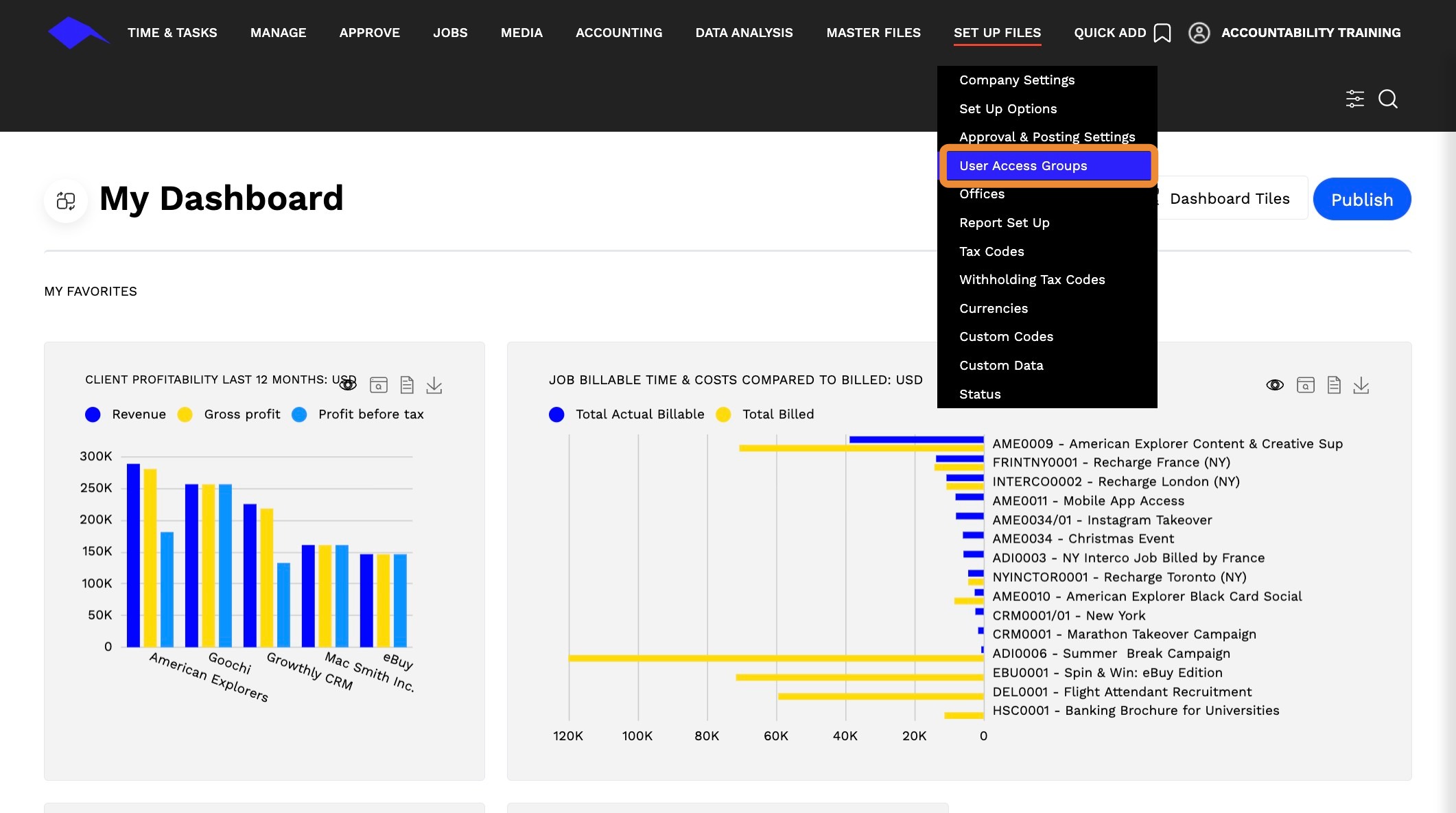
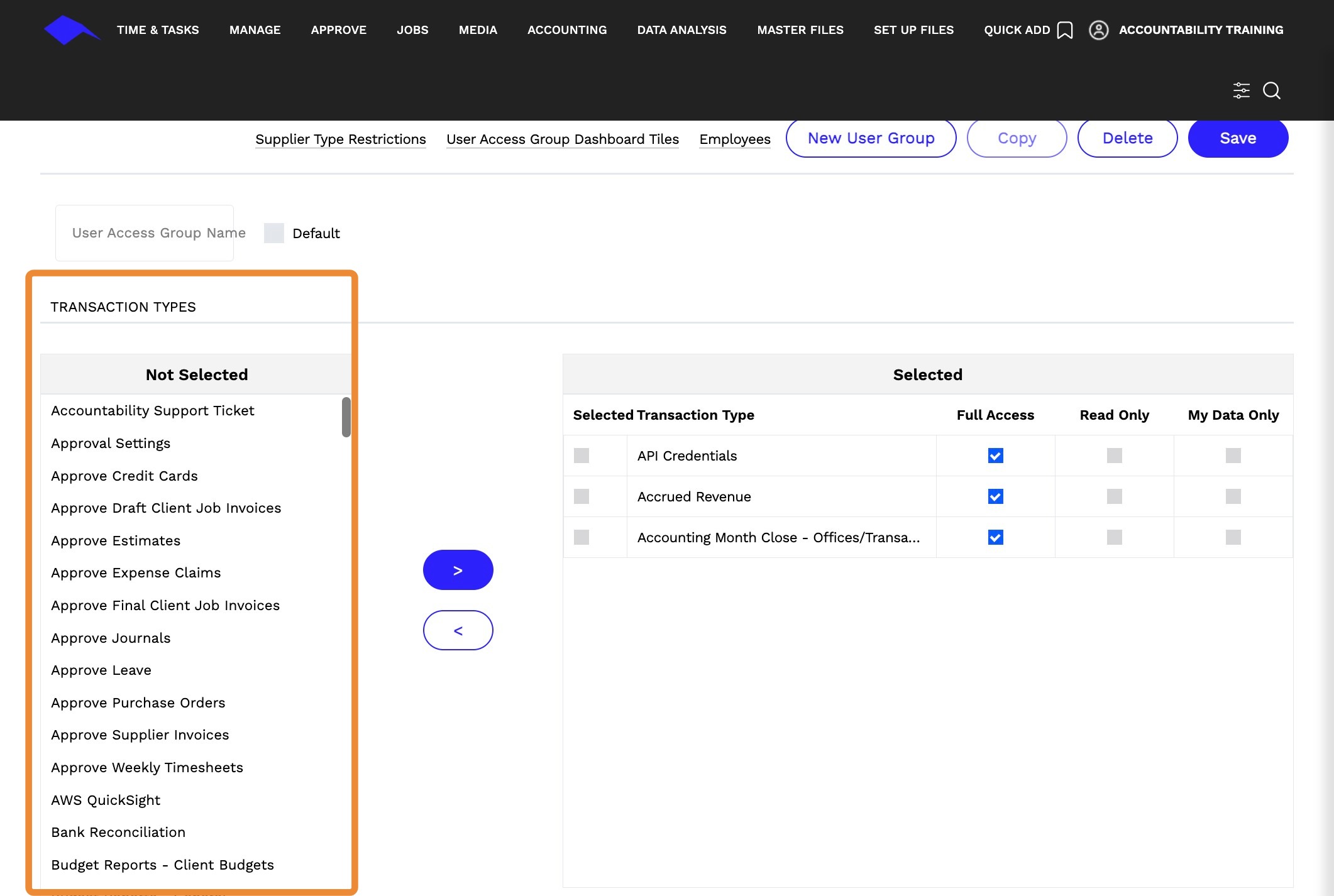
1. Navigate to Set Up Files > User Access Group.
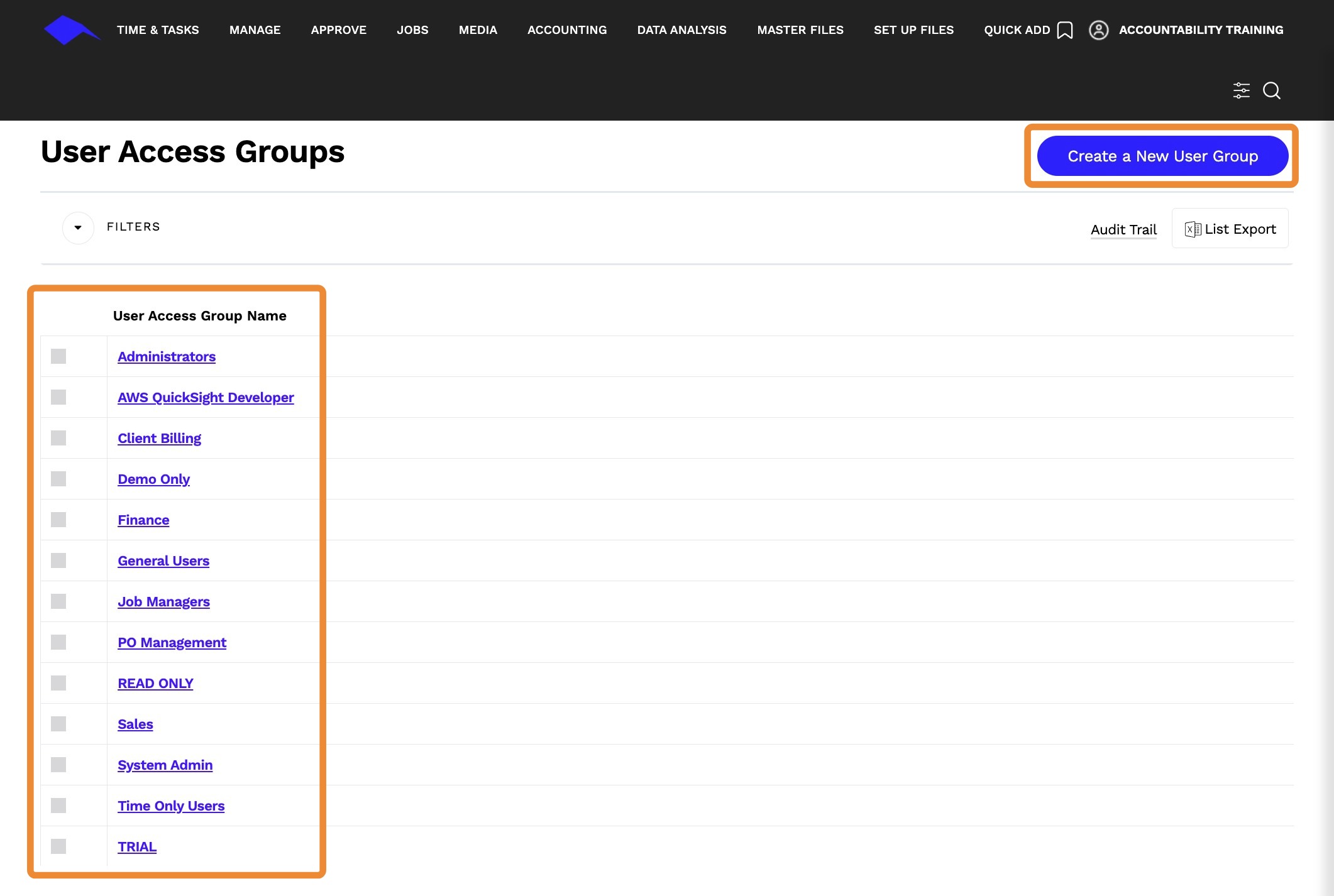
2. Create A New User Group or click a user group name link.
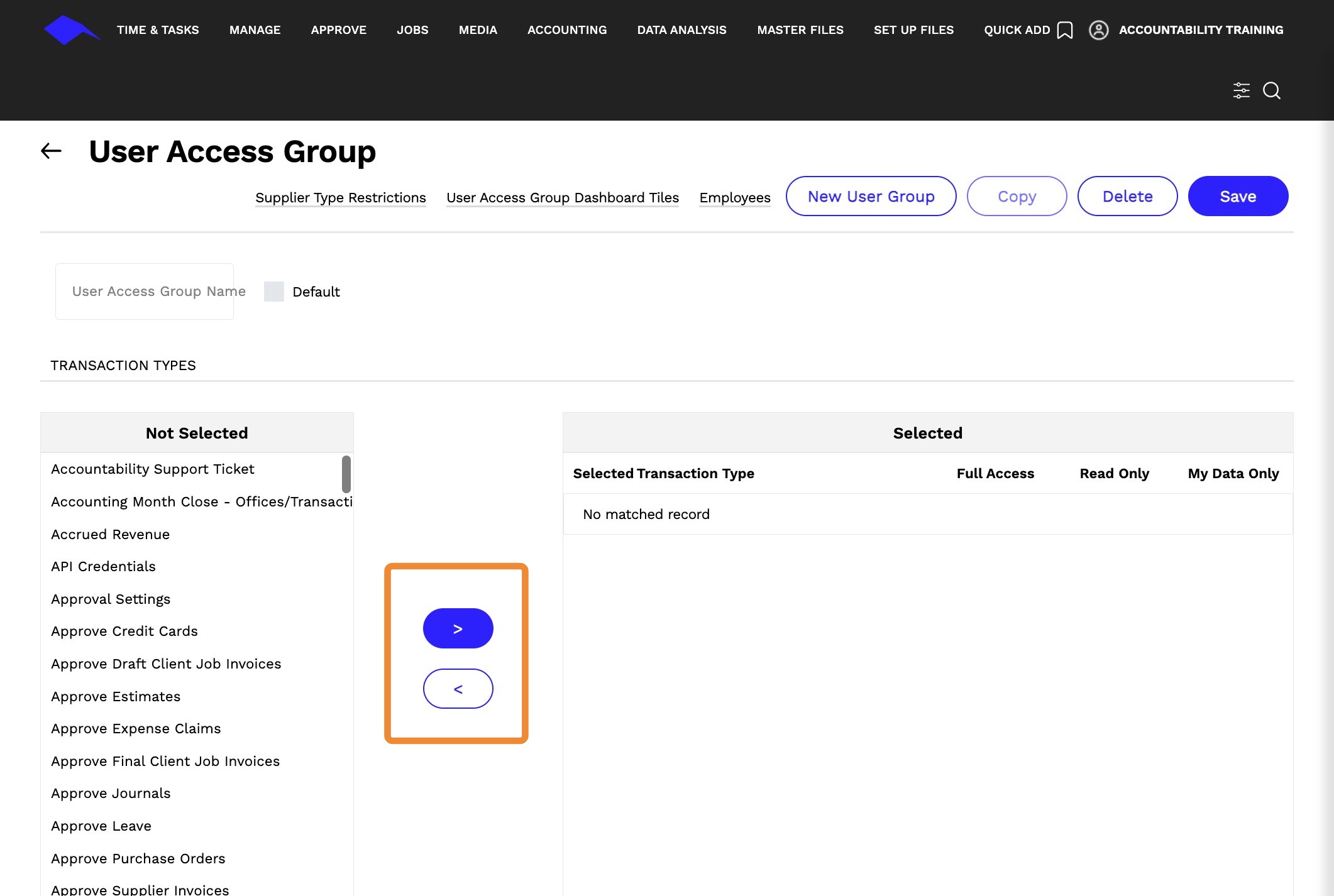
3. Add or remove access from the list by using the right or left arrows.
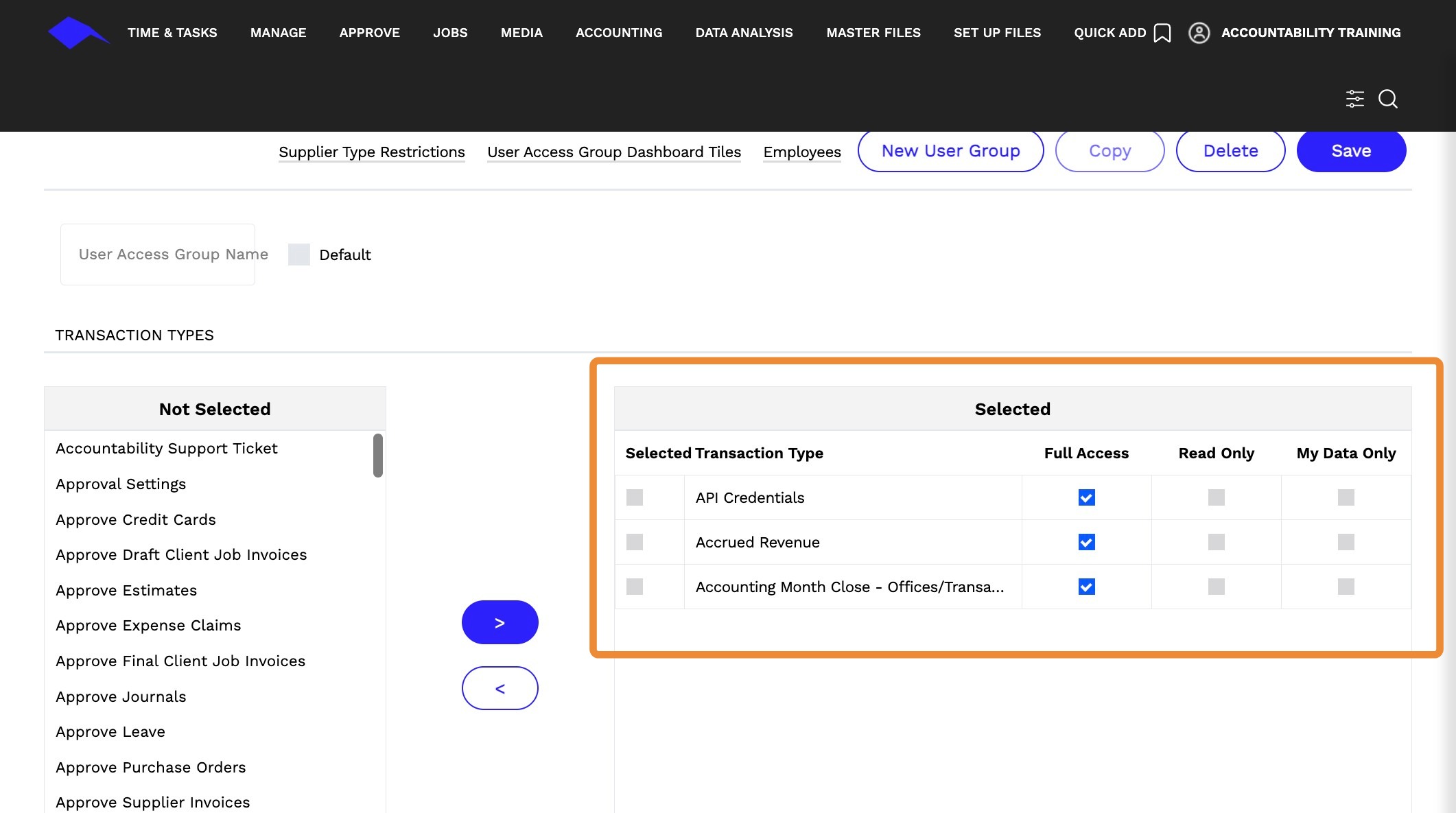
4. There are 3 levels of access for each transaction type.
- Full Access
- Read Only
- My Data Only
5. The following is a list of existing transaction types and the corresponding module and page within the platform.
Transaction Types | General
Tip: - Accountability Support Ticket - Easily submit and track the status of your support tickets within Accountability. To learn more about support tickets, click here.
- Accountability User Messages - My Messages allow you to send correspondence from the system to contacts established in the system. This allows you to retain the trail of correspondence in the system and be able to search for it. To learn more about messages, click here.
- Files
- Messages- Only available if the Use Media setup option is on. This is Accountability's media module, not used for external media system integrations.
- Page Links- Set Up Files>Set Up Options (see Page Links hyperlink)
Transaction Types | Setup Files
Tip: - Accounting Month Close Office/Transaction Types - Close the accounting month for specific transaction types and/or offices. To learn more, click here.
- Approval Settings - Approval settings at the company level. To learn more, click here.
- Currencies - Define Currency Exchange Rate to Home Currency
- Custom Codes
- Custom Data - Create Custom Fields
- FX Monthly Report Rates
- Offices
- Report Disclaimers and Email Text
- Report Logos
- Report Settings
- Set Up Options - Database-level configuration
- Status - Used in Jobs - People and Deadlines link
- Task Types
- Tax Invoice Receipt
- Task Codes
- User Access Groups- Defines system and transaction access for a group of users with the same role/responsibilities
- Withholding Tax Codes
Transaction Types | Accounting
Tip: -
- Accrued Revenue-Close the accounting month for specific transaction types and/or offices. To learn more, click here.**
- Bank Reconciliation- Bank reconciliation aligns your monthly bank statement with your recorded cash transactions in Accountability. It verifies that all cash transactions are logged, mirrors your bank balance, and ensures accurate financial reporting. To learn more, click here.
- Budget Reports - Client Budgets- Allows you to create or amend budget amounts for client billing and revenue for a specific accounting year, budget category, and version.
- Budget Reports - General- View and print reports for different periods, currencies, budget versions, and offices. To learn more, click here.
- Budget Set-up- Create or amend billing and revenue budgets for a specific accounting year, budget category, and version. To learn more, click here.
- Budgets- Overview and analysis of an organization's financial performance. To learn more, click here.
- Client Budget Assumptions- Accessible through Budgets>Client Budgets, but not used by any agency today
- Client Budgets
- Client Inquiry- Online Receivables Aging by master client with the ability to drill down into specific client invoices
- Client Resource Planning- Accounting>Budgets>Resource Planning
- Deferred Revenue
- Fixed Asset Depreciation
- Fixed Assets
- FX Revaluations- Set up to automatically revalue foreign currency Receivables and Payables balances
- General Ledger Accounts
- General Ledger Reports
- General Ledger Transaction Search
- GL Balance Sheet Reports
- GL Client Billings and Revenue Reports
- GL Client Profitability Reports
- GL Profit & Loss Reports
- GL Report Formats
- GL Tax Reports
- GL Transaction Reports
- GL Trial Balance Reports
- Payments
- Payroll Budgets
- Posting GLAccount
- Posting Inter Office Accounts
- Probability- Accounting > Budgets>Budget Set Up (see Probabilities link)
- Receipts
- Receivables Reports
- Retainers- Function to record and report on client retainers - each retainer must be linked to a source estimate that contains the retainer hours/values
- Revenue Management
- Revenue Recognition
- Supplier Invoice Approval
- Supplier Inquiry- Online Payables Aging by Master Supplier
- Supplier Invoices
- WIP Take Up Types- WIP Take Ups
- WIP Take Ups
Transaction Types | Jobs
Tip: - Campaigns-For job grouping and reporting purposes only
- Estimate Margins- provides access to the Margin Summary link from the Estimate list page or the estimate-level Margin analysis
- Estimate Templates
- Estimates
- Internal Charge Types
- Internal Charges
- Job Cash Summary- Online view of job-level cash position with ability to drill down into specific transaction types (requires access to transaction types)
- Job Financial Summary- Online view of job-level estimated, actual, and billed internal and external costs with the ability to drill down into specific jobs and task types
- Job Profitability Summary
- Job Reports
- Job Time Summary
- Job Types
- Job WIP Summary
- Jobs
- Purchase Order Approval
- Purchase Orders- Also accessible through the Job Estimate
- Resource Tracker
- Revenue Tracker
- Revenue Tracker Versions
- Supplier Bid Response- When a bid is sent out, this allows access to the responses sent by the suppliers
- Supplier Bids- Allows agencies to request bids from suppliers (limited usage)**
- Transfer Costs - Job Cost Transfer
Transaction Types | Master Files
Tip: - Chargeable Rates- Billable Rates
- Client Types
- Clients
- Contacts- Central management of contacts across clients, suppliers, and prospects; Contacts for each of these entities can be managed within the individual Master File pages, i.e. Clients, Suppliers, Prospects and are automatically populated here
- Departments
- Employee Cost Rate- Cost fields on the Employee detail page. Fields are only visible if the logged-in user has access rights, otherwise, it's hidden.
- Employees
- Products
- Prospect Types
- Prospect
- Supplier Bank Account Detail
- Supplier Payment Types
- Supplier Types
- Suppliers
- Teams- Used in conjunction with Timelines
- Titles
Transaction Types | PR Media
Tip: - Client PR Media Settings- Only visible for agencies that use the PR Media Tool, enabled at the time of implementation.
Transaction Types | Manage
Tip: - Credit Card Holders- Each individual credit card for the corporate credit card function is a 'Credit Card Holder'. See Manage / Credit Cards / Credit Card Holders in INSP - it links the credit card holder/card number to the employee and master credit card account
- Credit Card Merchants
- Employee Expense Summary
- Manage Inventory- Limited usage - can be used by the agency to manage merchandise materials on behalf of clients
- Manage Leave- Manager Approval view for time off (aka Leave) requests
Transaction Types | My Expenses
Tip: - Expense Claim Proxy- Provides access to another employee's expense claims
- Expense Claim Proxy Bank Account- Shows the Bank Account Details for the employee that the user is a proxy for
Transaction Types | Media
Tip: - Freewheel Media Invoices- Shows media client invoices from FW's Strata platform; Requires integration set-up and configuration
- Media Accruals & Deferrals- Only available if the Use Media setup option is on. This is Accountability's media module, not used for external media system integrations
- Media Appearance Reconciliation- Only available if the Use Media setup option is on. This is Accountability's media module, not used for external media system integrations
- Media Booking- Only available if the Use Media setup option is on. This is Accountability's media module, not used for external media system integrations
- Media Material- Only available if the Use Media setup option is on. This is Accountability's media module, not used for external media system integrations
- Media Reports- Only available if the Use Media setup option is on. This is Accountability's media module, not used for external media system integrations
- Media Revenue Take Ups- Only available if the Use Media setup option is on. This is Accountability's media module, not used for external media system integrations
- Media Schedule- Only available if the Use Media setup option is on. This is Accountability's media module, not used for external media system integrations
- Media Supplier Invoices- Only available if the Use Media setup option is on. This is Accountability's media module, not used for external media system integrations
- Media Types- Only available if the Use Media setup option is on. This is Accountability's media module, not used for external media system integrations
- Medium- Only available if the the Use Media setup option is on. This is Accountability's media module, not used for external media system integrations
Transaction Types | User
Tip: - Leave Request
- My Calendar- Useful for users who want to enter their timesheet in a calendar layout; Also goes hand-in-hand with Task Manager (limited usage)
- My Dashboard
- My Inventory Orders
Transaction Types | Expense Management
Tip: - Manage Credit Cards- Manager Approval view for credit card expenses; Manager approval rights need to be defined at the Employee level
- Manage Expense Claims-Manager Approval view for standard expense claims; Manager approval rights need to be defined at the employee level
- My Corporate Credit Cards- User>My Corporate Credit Cards: View of all corporate credit card expenses for submission; Data can be automatically populated through merchant integration
- My Credit Cards- User > My Credit Cards: View of all personal credit card expenses for reimbursement; Option to import data through Excel
- My Expense Reports- Summary of all expenses across corporate and individual credit cards and regular expense claim
- My Expenses- User > My Expenses Main Expense Claim page.
Transaction Types | Time and Tasks
Tip: - Time and Tasks
- Task Management
- Time Approval
- Time Reports
- Timeline Reports
- Timelines
- Timesheet Proxy
- Scheduled Invoices
- Sales Commissions
- Resource Tracker Reports
- Resource Tracker Client Summary
- Purchase Order Approval
- Manage Interoffice Journals
- Journal Approval
- Job Cost & Billing Summary
- Incoming Supplier Invoices
- FX Daily Rates
- Draft Client Job Invoice Approval
- Custom Codes
- Corporate Credit Card Proxy
- Column Views - Publish Rights
- Column Views - Company Default Rights
- Client Sundry Invoices
- Client Job Invoices
- Client Job Invoices Convert Draft
- Client Media Invoices